
Google Workspace Weekly Recap: AI-Powered Collaboration and Automation Boost Productivity
Google Workspace’s September updates bring AI-driven enhancements: one-click co-presenters in Google Meet, the pro-level Google Pics image tool, Google Vids turning documents into videos, and more.
Introduction
Google Workspace consistently rolls out new features, but the recent wave of updates is packed with significant improvements across multiple product lines—from video conferencing and document handling to image creation and workflow automation.
Whether you’re a business manager constantly in meetings, a marketer crafting visual assets, or an operations specialist looking to automate repetitive tasks, there’s something in this update cycle that can make your daily routine noticeably smoother.
Let’s dive into how these changes are making everyday work easier and more efficient.
Google Meet: Add Co-Presenters with One Click
In the past, if you were sharing a Google Slides presentation in Google Meet and wanted to give control to a colleague, the process was clunky. It meant navigating through multiple menus, searching for the right setting, and interrupting the flow of the meeting to get it done.
Now, that hassle has been completely eliminated.
Gemini intelligently listens to the conversation in your meeting. When someone says a natural language cue like “Can you please add me as a co-presenter?” or “Next slide please,” the system identifies the request. It then prompts the current presenter with a suggestion directly in the “Ask Gemini in Meet” side panel. The presenter can grant control with just a single click—no menu diving required.
This feature currently works on Google Chrome and Microsoft Edge browsers, with voice commands supported only in English for now. It is available for Google Workspace Business Standard, Business Plus, Enterprise Standard, and Enterprise Plus plans, with the rollout beginning in late August 2026.
Google Pics: Bringing Pro-Level AI Image Capabilities into Workspace
Google Pics has officially become generally available for Google Workspace users. This isn’t a standalone app you need to download; it’s a native capability embedded directly into Google Docs and Google Slides.
Powered by Google’s latest Nano Banana AI image generation model, Pics works like a dream for creators—you simply describe the image you want in plain language, and the AI generates multiple options in seconds.
But Pics goes far beyond simple generation:
-
Precise Object Editing: You can select individual elements within an image to modify them without regenerating the whole scene. For example, if you generate an office image and decide the coffee cup color is wrong, you can select just that cup and change it.
-
Edit and Translate Text Within Images: You can select, edit, or even translate text directly inside a picture—a game-changer for global teams localizing content.
-
Real-Time Collaboration: Team members can adjust colors, add annotations, and refine visuals simultaneously on the same canvas. Generation, editing, and collaboration happen in one unified space.
The initial rollout focuses on Google Docs and Google Slides, with plans to extend to Google Drive later. This feature is available to Google AI Pro and Google AI Ultra subscribers, as well as most Google Workspace business users.
Google Vids: Turn Documents into Video Summaries
Google Vids can now automatically transform static documents—including Google Docs, PDFs, and Word files—into engaging video summaries complete with AI-generated scripts, voiceovers, and custom visuals.
The process is straightforward: In Google Vids, select “Create from document,” choose your file, and let the AI do the heavy lifting. It parses the content, generates a coherent script, adds narration, and pairs it with relevant visuals.
This feature is particularly valuable for:
-
Training Materials: Converting lengthy training manuals into digestible video tutorials.
-
Meeting Recaps: Summarizing detailed meeting notes into a concise, watchable recap.
-
Long Reports: Helping decision-makers quickly grasp the core takeaways of extensive reports.
The feature begins rolling out on September 5, 2026, and consumer-level users will need a Google AI Plus subscription to access it.
Workspace Studio: Four New Automation Steps
Google Workspace’s low-code automation tool, Workspace Studio, just got more powerful with the addition of four new automation steps:
-
Move Drive file
-
Copy Drive file
-
Send a Chat reply
These new building blocks significantly expand what you can automate without writing a single line of code. You can set up triggers that automatically execute these actions based on specific events.
Gemini Custom Instructions Expand to More Apps
Earlier this year, Google introduced custom instructions for Gemini in Google Docs—a feature that allows users to set persistent guidelines so the AI consistently follows specific tones, formats, and styles in every interaction.
Now, this functionality is expanding to more Gemini in Workspace surfaces. This means your personalized AI preferences will travel with you across different apps, ensuring a more consistent and tailored experience no matter where you’re working.
Gemini Notebook Introduces Comprehensive Audit Logs
For enterprise administrators, Gemini Notebook now offers comprehensive audit logs. This update provides full visibility into how the application is used across an organization. Admins can now see exactly who accessed Gemini, when they accessed it, from which IP address, and in which application.
Audit logs are enabled by default in the Admin console, though exporting logs to BigQuery requires manual activation. Log data is retained for 6 months. The rollout began on September 3, 2026.
This is a critical addition for organizations with strict compliance requirements, making AI tool usage transparent and fully auditable.
Google Meet Hardware: Transitioning from ChromeOS to Android
Google is gradually transitioning its Google Meet room hardware portfolio from ChromeOS to Android (AOSP) . The goal of this move is to deliver features faster, broaden device choices, and increase flexibility for businesses.
Google is working closely with hardware partners, including Logitech, Neat, and HP Poly, to deliver Google Meet-certified devices for spaces of all sizes. Several exciting Android devices designed specifically for large-format spaces are already planned for release in 2027.
Important Note for Existing Users: Support for current ChromeOS-based devices will continue until September 2030, giving organizations plenty of time to plan their transition without immediate pressure.
Google Meet and Microsoft Teams Interoperability (Early Preview)
Device interoperability between Google Meet and Microsoft Teams has now entered Early Preview.
This means:
-
Joining Microsoft Teams meetings directly from Google Meet hardware devices.
-
Joining Google Meet meetings directly from Microsoft Teams Rooms.
Previously, this interoperability was available on ChromeOS-based Google Meet Rooms and Windows-based Teams Rooms. This update extends that capability to Android (AOSP) devices.
This feature is open to all Google Workspace customers with Android/AOSP-based Google Meet hardware devices, and administrators can toggle it on/off at the organizational unit level. The Early Preview started rolling out on August 31, 2026.
Conclusion
This September 2026 wave of Google Workspace updates clearly illustrates Google’s strategic direction: deeply embedding AI into everyday workflows rather than treating it as a separate tool you have to open in a new tab.
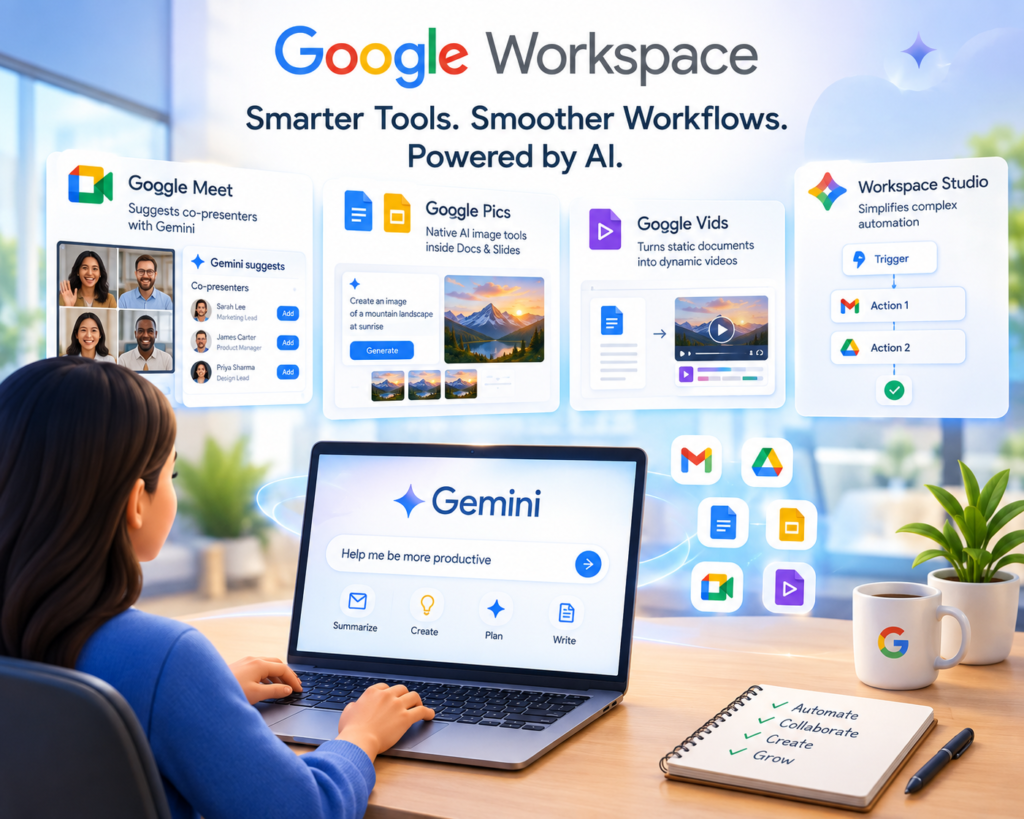
Whether it’s Gemini intelligently suggesting co-presenters in Google Meet, Google Pics providing native AI image tools inside Docs and Slides, Google Vids turning static documents into dynamic videos, or Workspace Studio simplifying complex automation—the common thread is clear: make complicated tasks simple and repetitive tasks automatic.
For enterprise users, now is the perfect time to re-evaluate your team’s workflows. Identify which of these new capabilities can plug into your existing processes. AI won’t replace your job, but teams that strategically leverage these tools will gain a significant edge in efficiency and creativity.