
Streamline IT & HR with the New 1Password App for Google Chat
learn how this integration can transform your IT and HR workflows.
If you need professional guidance to implement 1Password SaaS Manager and Google Chat within your organization, the team at AlpineSoft IT is ready to assist you every step of the way.
Our experts will help you set up custom workflows tailored to your business needs.
Introduction
Imagine a world where IT and HR teams no longer have to juggle between multiple tabs, dashboards, and tools just to approve a simple access request. What if everything—from notifications to final approvals—could happen right where your team already collaborates every day?
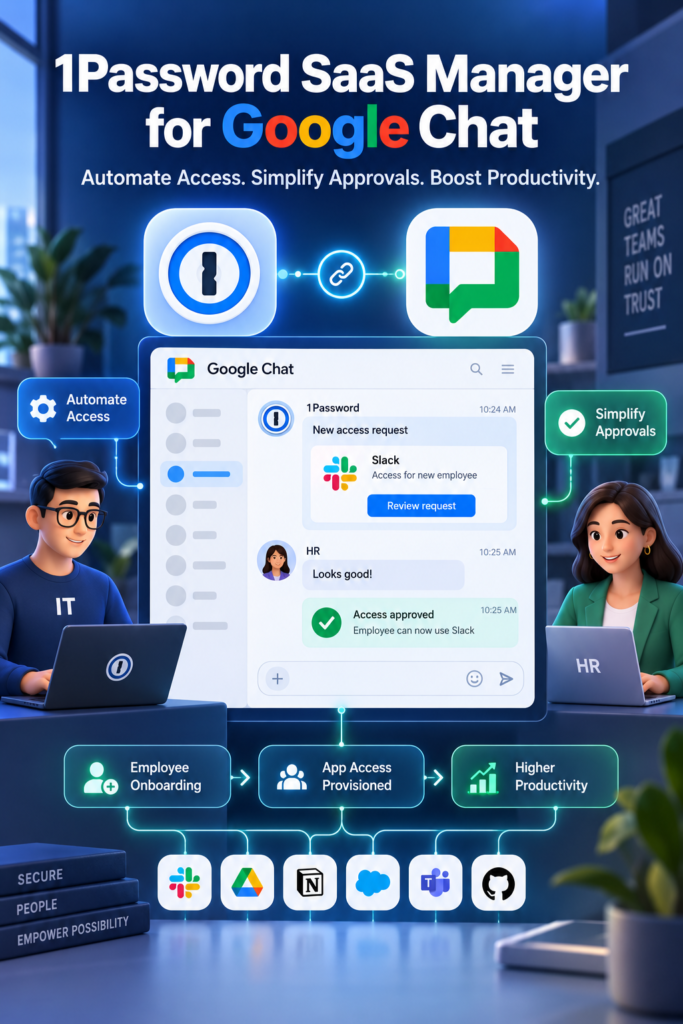
That vision is now a reality. The new 1Password App for Google Chat brings the power of 1Password SaaS Manager directly into your Google Workspace environment. This integration transforms Google Chat from a simple messaging platform into a command center for managing employee access, automating workflows, and streamlining IT operations.
Let’s explore how this integration works and why it’s a game-changer for businesses of all sizes.
What is the 1Password SaaS Manager Integration for Google Chat?
1Password SaaS Manager is a comprehensive platform that helps IT teams discover, manage, and secure all the SaaS applications used within an organization. With over 300 direct app integrations and automated workflows, it provides a single point of control for managing your organization’s sprawling SaaS landscape.
The new Google Chat integration brings these capabilities directly into your team’s communication hub. Instead of switching between the SaaS Manager dashboard and your chat tool, you can now receive notifications, take actions, and approve requests directly within Google Chat.
In Simple Terms: 1Password SaaS Manager helps you keep track of all the apps your company uses. This new integration brings that power into Google Chat, so you can manage access and approve requests without leaving your conversations.
Key Features and Benefits
1. Automated Workflows for Employee Access
The integration allows teams to build automated workflows for common employee access scenarios. This includes:
-
Provisioning: Automatically granting new employees access to the tools they need.
-
Deprovisioning: Instantly revoking access when an employee leaves, reducing security risks.
-
Membership Management: Managing membership across Google Chat spaces and other connected apps.
2. In-Chat Notifications, Actions, and Approvals
Perhaps the most powerful feature is the ability to review and act on requests without leaving Google Chat.
-
Managers and approvers receive interactive messages directly in Chat.
-
They can approve, deny, or take other actions with a single click.
-
This eliminates the need to switch tools, reducing delays and keeping decisions moving quickly.
Real-World Example: When a new marketing hire joins the team, an automated workflow can trigger a request in Google Chat. The marketing manager receives a message asking for approval to grant access to tools like HubSpot and Canva. With a single click in Chat, the manager approves the request, and access is automatically provisioned—all within minutes.
3. Streamlined IT and HR Processes
By bringing notifications, actions, and approvals into Chat, the integration significantly streamlines IT and HR operations. Common use cases include:
| Process | How It Works in Google Chat |
|---|---|
| New Employee Onboarding | Automated request sent to IT manager for approval; access granted upon approval. |
| Access Change Requests | Employee requests access to a new tool; manager approves directly in Chat. |
| Offboarding | Deprovisioning request triggered; all access revoked upon manager approval. |
| License Optimization | Notifications about unused licenses; actions can be taken to reclaim them. |
How to Get Started
Getting started with the 1Password App for Google Chat is straightforward, with clear steps for both admins and end users.
For Administrators
Admins can install the 1Password SaaS Manager Chat app on behalf of their entire organization. Here’s how:
-
Log in to the Google Admin console.
-
Navigate to Apps > Google Workspace Marketplace apps > Apps list.
-
Click Install app.
-
Search for “1Password SaaS Manager”.
-
Accept the Terms of Service and click Finish.
An additional step is required to allow SaaS Manager to send messages to users without them initiating the conversation:
-
In the Google Admin console, go to Security > Access and data control > API controls.
-
Click Manage Domain Wide Delegation.
-
In the API clients panel, click Add new and enter the required Client ID and OAuth scope.
Note: For detailed installation instructions, visit the Google Workspace Marketplace or the 1Password Help Center.
For End Users
End users need a 1Password SaaS Manager account to use the app. They can also:
-
Search for the 1Password Chat App under Apps > Find apps in Google Chat.
-
Install the app directly from the Google Workspace Marketplace.
Conclusion
The new 1Password App for Google Chat is more than just another integration—it’s a fundamental shift in how IT and HR teams can manage employee access. By bringing notifications, actions, and approvals directly into the flow of work, it eliminates friction, reduces delays, and keeps your organization secure.
For Google Workspace administrators, it offers a powerful new tool to manage the growing complexity of SaaS applications. For managers and employees, it makes requesting and approving access as easy as sending a chat message.
If your organization uses Google Workspace and 1Password, this integration is a must-try. It’s available now, so start exploring how it can transform your IT and HR workflows today.